About this template
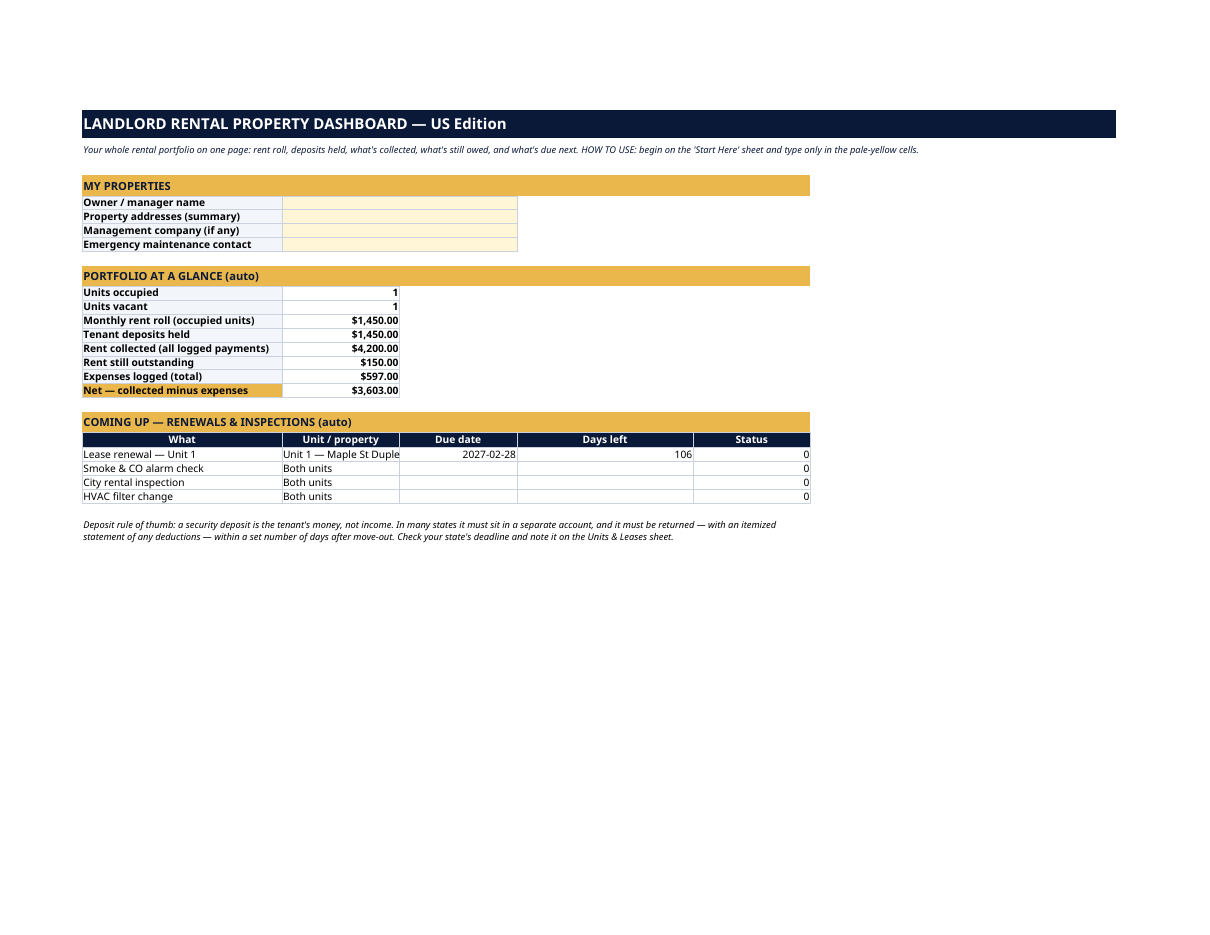
What is your rent roll, really? How much deposit money are you holding — and whose is it? Who still owes you for this month, and when does that lease actually end? The Landlord Rental Property Dashboard answers all of it on one page. You type the facts once, in pale-yellow cells — units, leases, payments, expenses, deadlines. Every total, balance and countdown updates by itself. The grey SAMPLE rows are a fictional duplex — Unit A rented at $1,450 with three months of payments logged (one of them partial, so you can see an outstanding balance), Unit B vacant — plus two sample expenses. Nothing about them is real. Delete the SAMPLE rows when you're ready and the whole file is yours. This dashboard is an organizational and record-keeping tool, not legal or tax advice. Security-deposit handling, notice periods and eviction rules vary by state — check your state and local rules. Remember: a security deposit is the tenant's money, not income; in many states it must sit in a separate account and be returned, with an itemized statement, within a set number of days after move-out. LICENSE Personal use only — for your own household. Please do not share, resell or redistribute the file. © 2026 99toFive — US Life Dashboards. All rights reserved.
What's inside
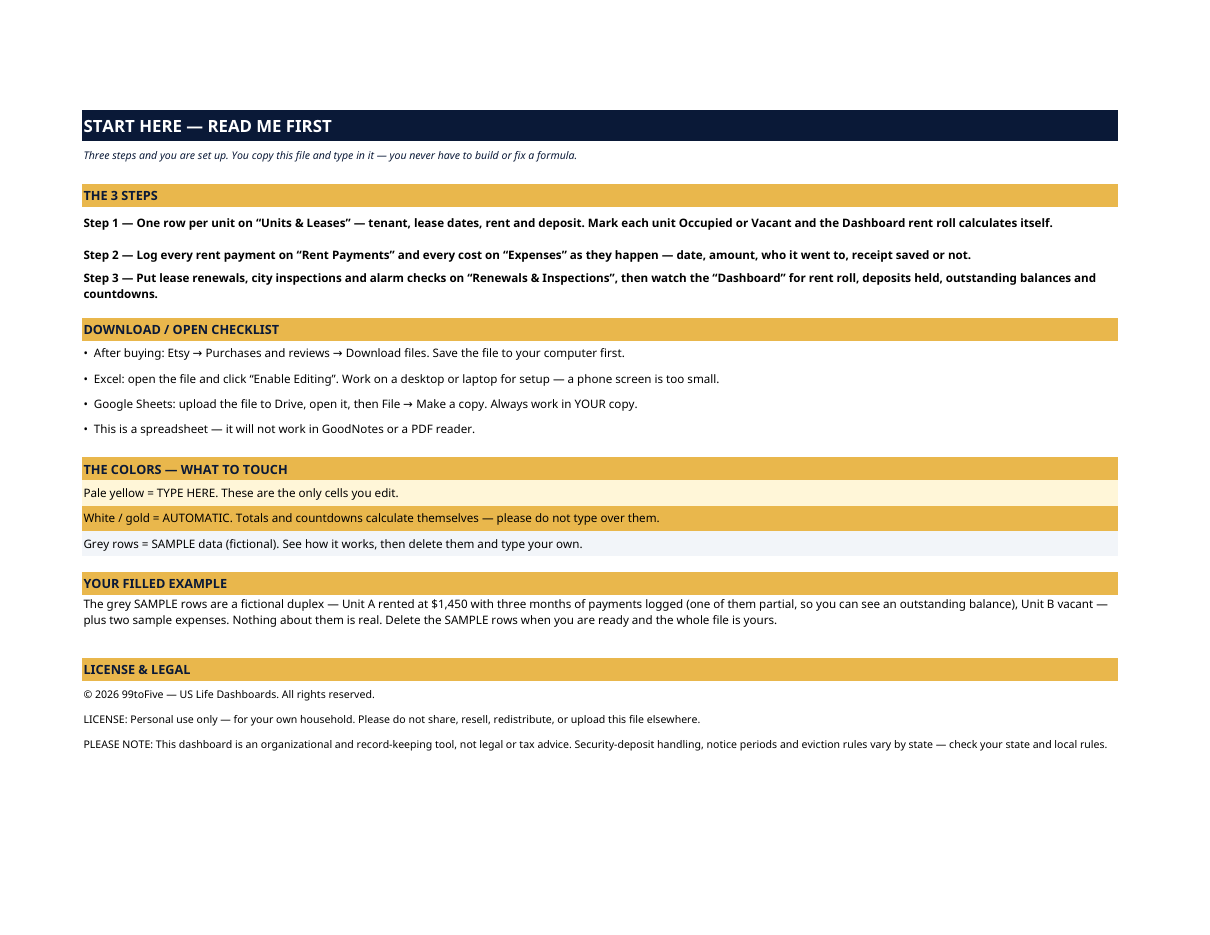
- Start Here — the 3 steps, a download/open checklist for Etsy, Excel and Google Sheets, the color guide (pale yellow = type here; white/gold = automatic; grey = sample data), a walk-through of the filled example, and the license.
- Dashboard — the one-page summary. Occupied and vacant unit counts, the monthly rent roll, tenant deposits held, rent collected across every logged payment, rent still outstanding, total expenses, a net line (collected minus expenses), and the next renewals & inspections with day counts.
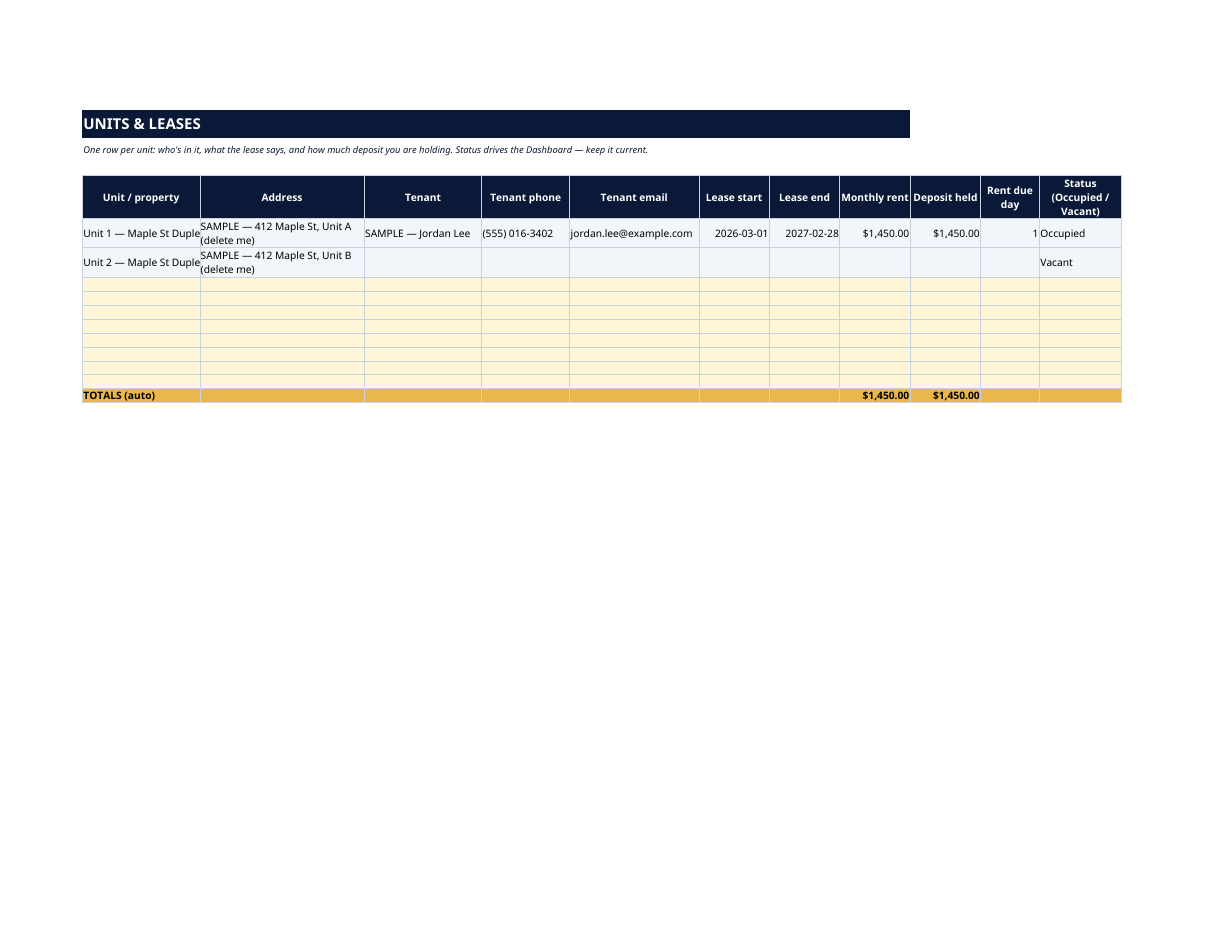
- Units & Leases — one row per unit: address, tenant name, phone and email, lease start and end, monthly rent, deposit held, rent due day, and status (Occupied / Vacant). The occupied rent roll and total deposits held calculate themselves at the bottom.
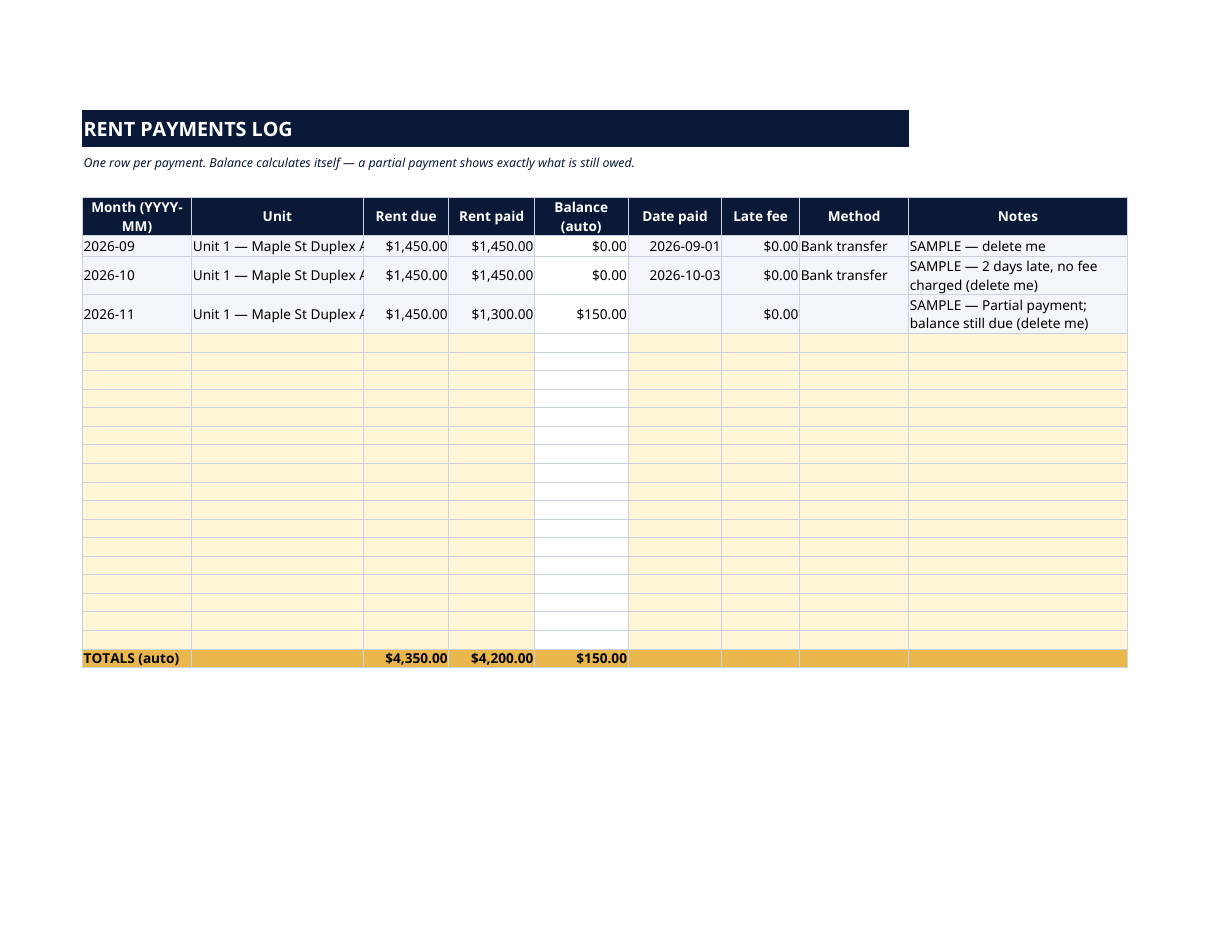
- Rent Payments — one row per payment: month, unit, rent due, rent paid, the balance owed (automatic — a partial payment shows exactly what's left), date paid, late fee, method and notes. Totals for due, paid and outstanding run along the bottom and feed the Dashboard.
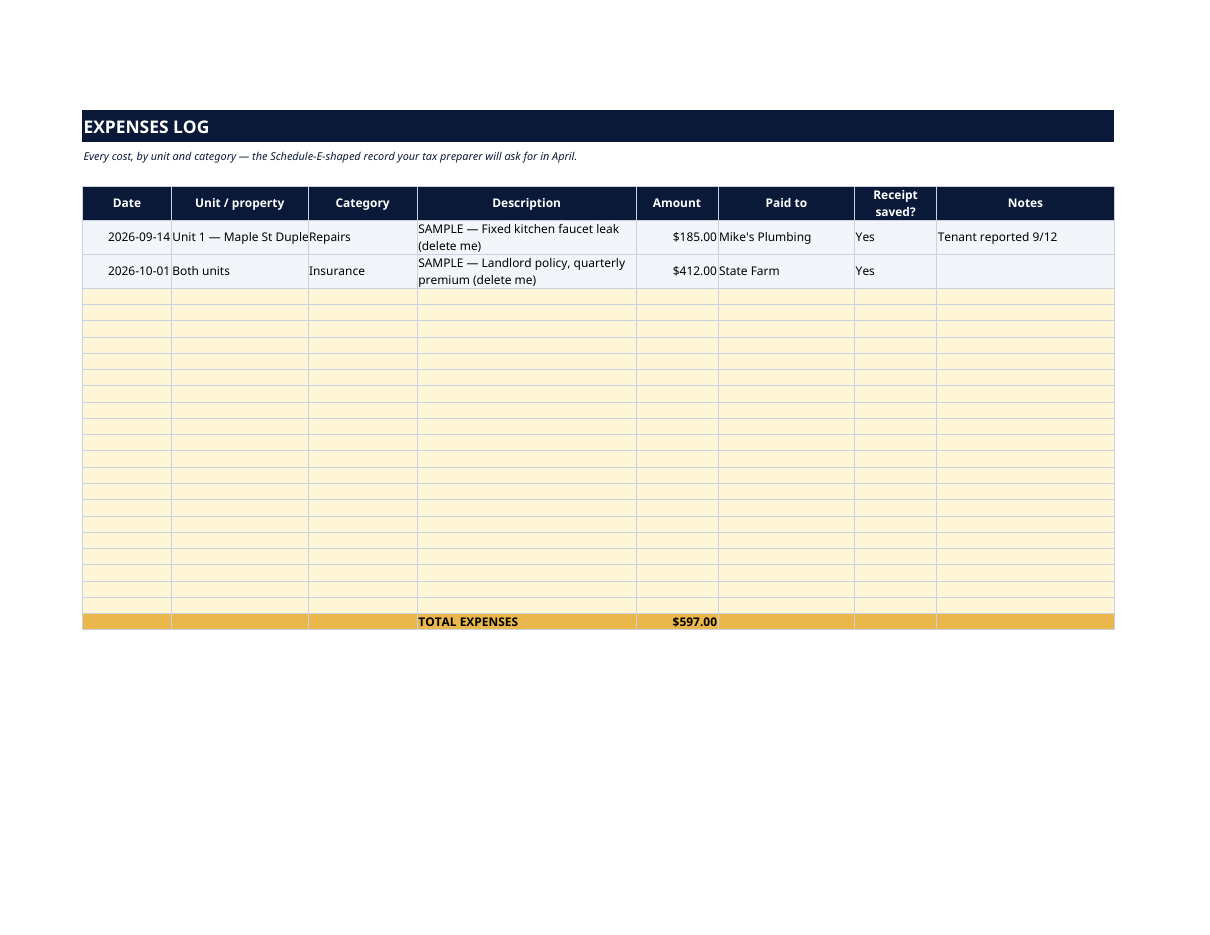
- Expenses — every cost as it happens: date, unit, category (repairs, maintenance, insurance, tax, HOA, utilities, management, legal…), description, amount, who you paid, and whether the receipt is saved. A Schedule-E-shaped record your tax preparer will thank you for in April.
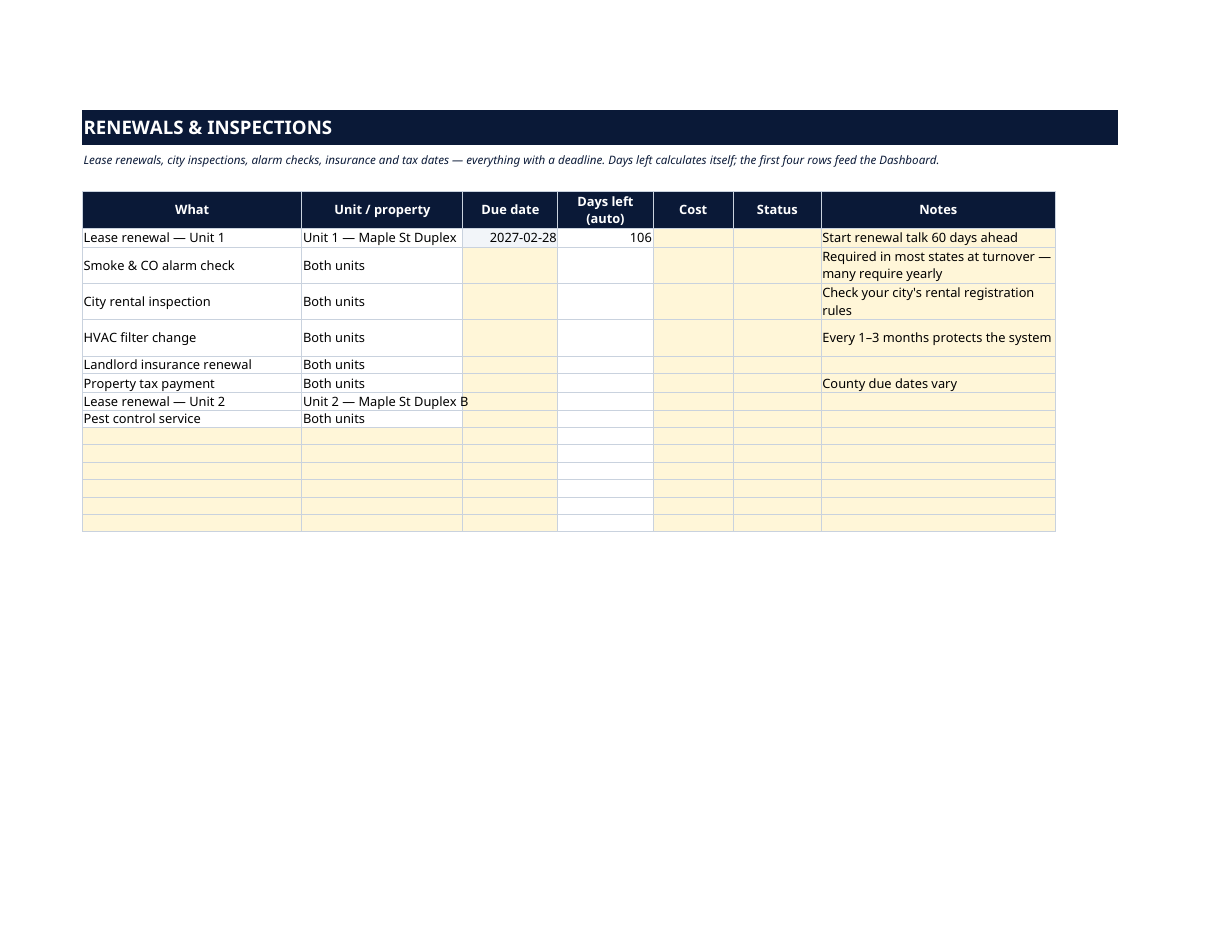
- Renewals & Inspections — lease renewals, smoke & CO alarm checks, city rental inspections, HVAC filter changes, insurance renewal and property tax dates, pre-listed with room for more: due date, automatic days-left countdown, cost, status and notes. The first four rows feed the Dashboard, so no deadline sneaks up on you.
How it works — 3 steps
- One row per unit on Units & Leases: tenant, lease dates, rent, deposit. Mark each unit Occupied or Vacant and the rent roll calculates itself.
- Log every payment on Rent Payments and every cost on Expenses as they happen.
- Put renewals, inspections and alarm checks on Renewals & Inspections, then watch the Dashboard for rent roll, deposits, outstanding balances and countdowns.
You never build or fix a formula. Type only in the pale-yellow cells — the formula cells are protected (no password) so the math can't be broken by accident. Fictional SAMPLE rows, clearly marked, show you the format; delete them and the file is yours.
What you need
Microsoft Excel, or Google Sheets (free with a Google account). One file works in both. A desktop or laptop is best for setup — a phone screen is too small. This is a spreadsheet. It will not work in GoodNotes, Notability or a PDF reader.
Instant download
This is a digital download — no physical item will be shipped. After purchase, go to Etsy → Purchases and reviews → Download files, save the file to your computer first, then open it in Excel (click “Enable Editing”) or upload it to Google Drive for Sheets (then File → Make a copy, and always work in your copy).
License
Personal use only — for your own household. Please do not share, resell or redistribute the file.
Questions
Does it work in Google Sheets as well as Excel?
Yes — the same .xlsx file works in both. Upload it to Google Drive, open it, then choose File → Make a copy and work in your copy.
I'm not good with spreadsheets. Is this for me?
Yes. You only ever type in the pale-yellow cells; everything else calculates itself. Instructions are printed at the top of every sheet, and a filled fictional duplex shows you exactly what goes where.
How many units can it handle?
Units & Leases has 10 unit rows ready, Rent Payments has 20 payment rows and Expenses has 22 — and you can insert more rows in any of them. It's built for small landlords: a duplex, a few single-families, a small multi-unit.
How does the outstanding-rent tracking work?
Every payment row calculates its own balance (due minus paid). A partial payment leaves the exact amount still owed on that row, and the totals — and the Dashboard — carry the full outstanding figure.
Does it handle security deposits?
Yes — deposit held is recorded per unit on Units & Leases and totaled on the Dashboard, kept visibly separate from rent, because deposit money is the tenant's, not yours. The sheet also reminds you that return deadlines vary by state.