About this template
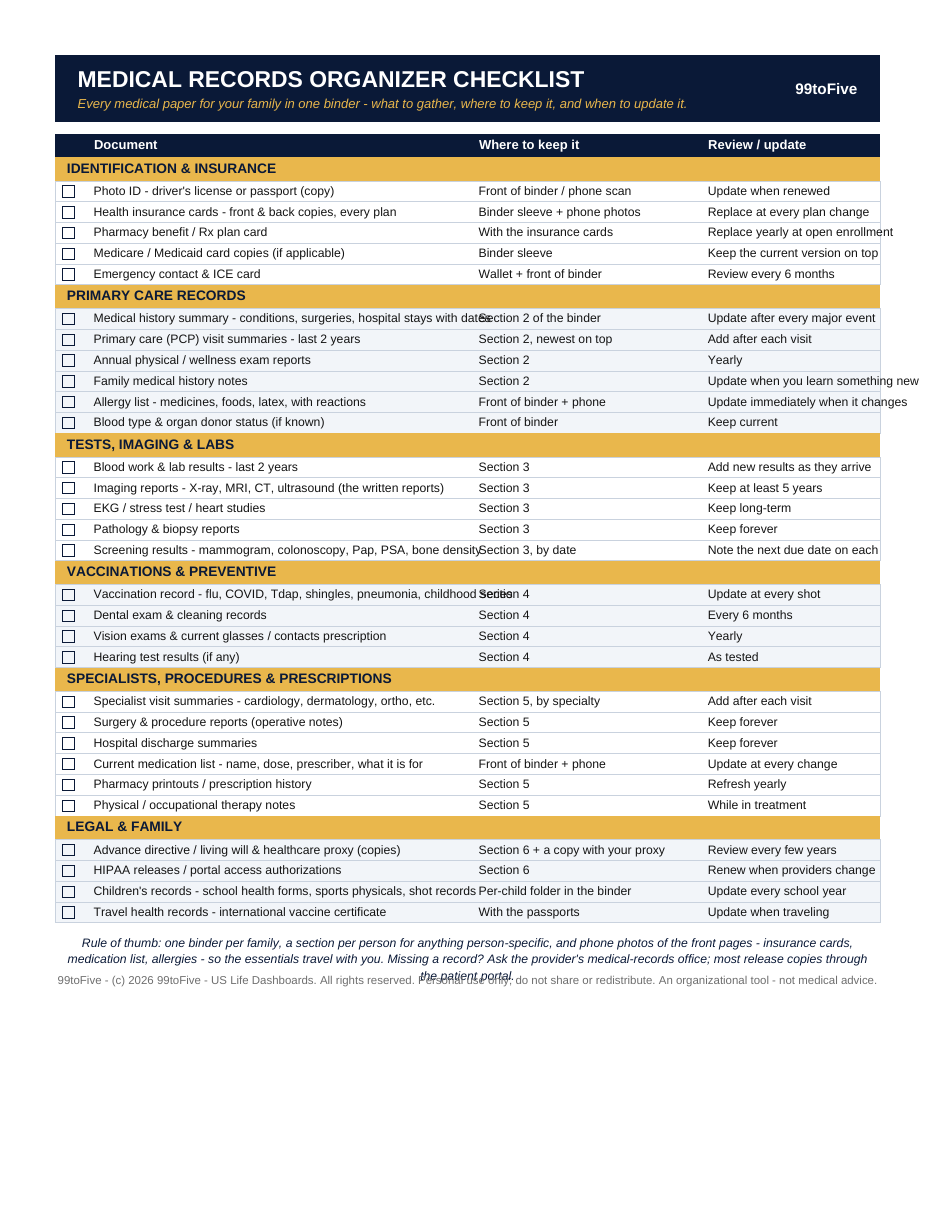
A new doctor asks for your last labs, your vaccine record, the imaging report from two years ago. The ER asks what medications you're on and what you're allergic to. Could you put your hands on all of it tonight? This one-page checklist names all 30 records a family should keep, tells you where each one lives, and when to update it. Print it, check the boxes off, and put it in the front of your health binder. You get it two ways: a printable PDF for paper-and-pen checking, and the same checklist as a spreadsheet that scores your completeness automatically.
What's inside
- Identification & Insurance (5) — photo ID copies, health insurance cards (front & back, every plan), pharmacy benefit card, Medicare/Medicaid card copies, and an emergency contact & ICE card.
- Primary Care Records (6) — medical history summary (conditions, surgeries, hospital stays with dates), PCP visit summaries, annual physical reports, family medical history notes, your allergy list with reactions, and blood type & organ donor status.
- Tests, Imaging & Labs (5) — blood work and lab results, imaging reports (X-ray, MRI, CT, ultrasound — the written reports), EKG and heart studies, pathology & biopsy reports, and screening results with their next due dates.
- Vaccinations & Preventive (4) — the full vaccination record (flu, COVID, Tdap, shingles, pneumonia, childhood series), dental records, vision exams and your current glasses/contacts prescription, and hearing tests.
- Specialists, Procedures & Prescriptions (6) — specialist visit summaries by specialty, surgery & procedure reports, hospital discharge summaries, your current medication list (name, dose, prescriber, what it's for), pharmacy printouts, and therapy notes.
- Legal & Family (4) — advance directive / living will & healthcare proxy copies, HIPAA releases and portal authorizations, children's school health forms and sports physicals, and travel health records.
How it works — 3 steps
- Print the PDF (US Letter) or open the spreadsheet version.
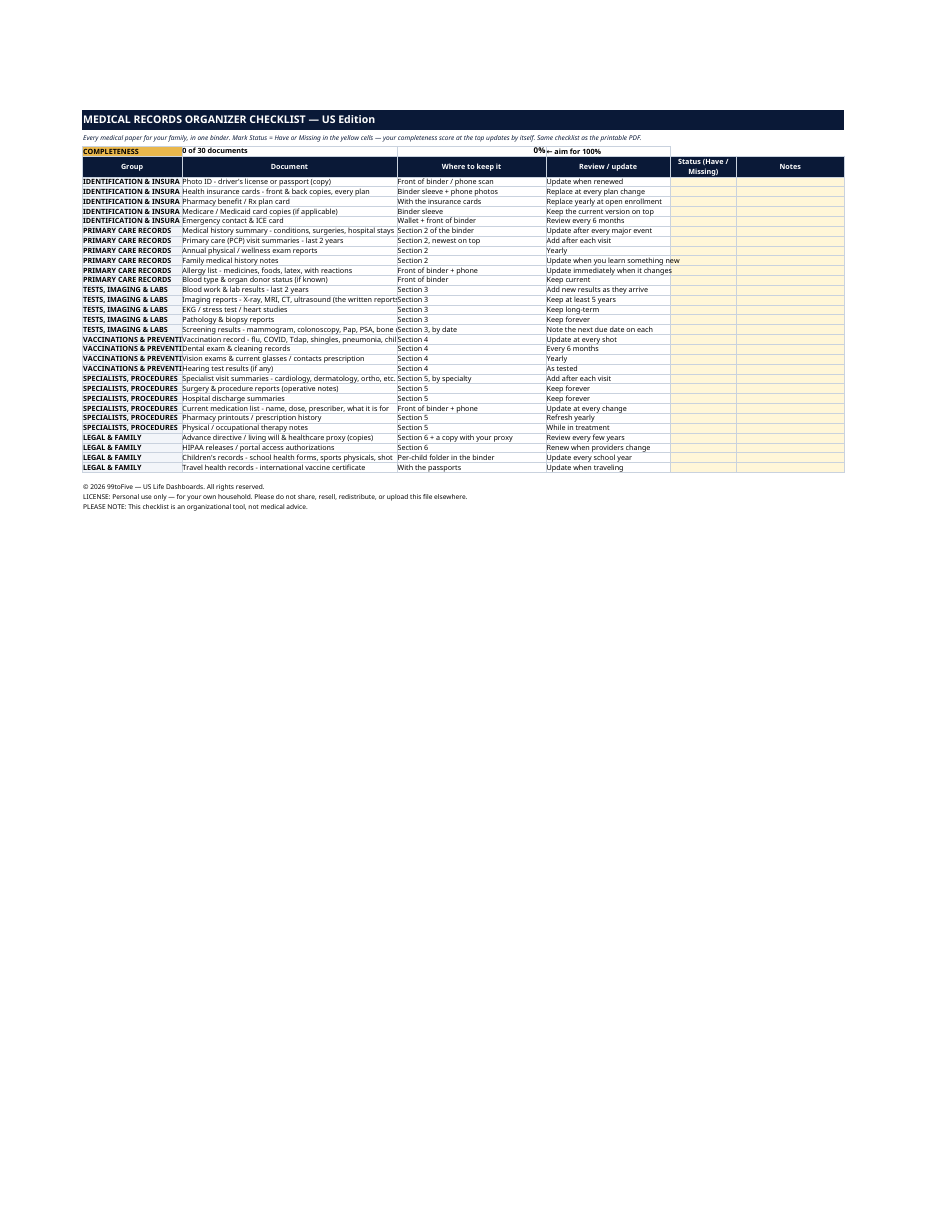
- Go record by record: check the box (PDF) or mark Status = Have / Missing (spreadsheet), and note where each one lives.
- File this page at the front of your binder, and re-check it every 6 months — the spreadsheet counts you toward 100% as you go.
You never build or fix a formula. Type only in the pale-yellow cells — the formula cells are protected (no password) so the math can't be broken by accident. Fictional SAMPLE rows, clearly marked, show you the format; delete them and the file is yours.
What you need
For the PDF: any PDF reader, and a printer if you want the paper copy. For the spreadsheet: Microsoft Excel, or Google Sheets (free with a Google account). The same .xlsx file works in both — upload it to Google Drive, open it, File → Make a copy, and work in your copy. The spreadsheet version is the only part that needs Excel or Sheets; the printable PDF works anywhere.
Instant download
This is a digital download — no physical item will be shipped. After purchase, go to Etsy → Purchases and reviews → Download files, save the file to your computer first, then open it in Excel (click “Enable Editing”) or upload it to Google Drive for Sheets (then File → Make a copy, and always work in your copy).
License
Personal use only — for your own household. Please do not share, resell or redistribute the file.
Questions
What exactly do I receive?
Two files: a one-page printable PDF (US Letter) with checkboxes, and the same 30-record checklist as an Excel spreadsheet with Status and Notes columns and an automatic completeness score at the top.
Do I need Excel or Google Sheets?
Only for the spreadsheet version. The PDF prints and works with any PDF reader — if you only want the paper checklist, you're all set.
How does the spreadsheet score work?
Type "Have" or "Missing" in the yellow Status cells. The scoreboard at the top counts you — it starts at "0 of 30 documents, 0%" and the aim, printed right there, is 100%.
Is this for one person or a whole family?
A whole family. The checklist is built around one family binder: shared items (insurance cards, legal papers) once, and a section per person for anything person-specific like labs, imaging and visit summaries.
Where do I get records I don't have?
From the provider's medical-records office or the patient portal — most practices release copies of visit summaries, labs, imaging reports and vaccine records on request. The checklist tells you exactly what to ask for.