About this template
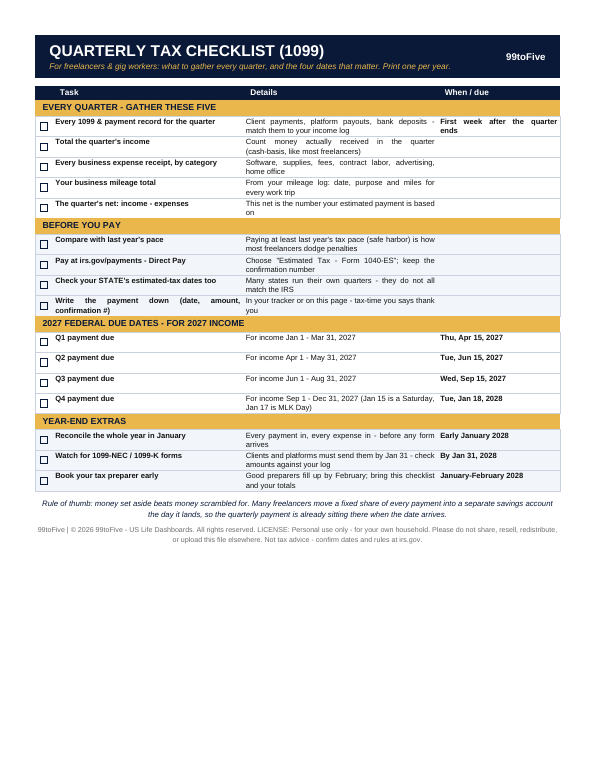
If you're paid on 1099s, nobody withholds your tax — the IRS expects you to estimate it and pay it four times a year, and missing a date can cost you a penalty even when you're due a refund. This one-page checklist is the whole routine: the five things to gather every quarter, the steps to take before you pay, the four federal due dates for 2027 income, and the year-end extras that make January painless. This checklist is an organizer, not tax advice. It does not calculate the tax you owe — it makes sure the gathering, the dates and the payment record never slip. Confirm current rates, dates and rules at irs.gov or with your tax professional.
What's inside
- Every Quarter — GATHER THESE FIVE: every 1099 and payment record matched to your income log; the quarter's total income (money actually received); every business expense receipt by category; your business mileage total; and the quarter's net — income minus expenses, the number your payment is based on.
- BEFORE YOU PAY: compare with last year's pace (the safe-harbor habit), pay at irs.gov/payments via Direct Pay and keep the confirmation number, check your STATE's estimated-tax dates too (they don't all match the IRS), and write the payment down. —
- 2027 Federal Due Dates — for 2027 income: Q1 Thu Apr 15, 2027 · Q2 Tue Jun 15, 2027 · Q3 Wed Sep 15, 2027 · Q4 Tue Jan 18, 2028 (Jan 15 is a Saturday and Jan 17 is MLK Day, so Q4 moves).
- YEAR-END EXTRAS: reconcile the whole year in January, watch for 1099-NEC / 1099-K forms by Jan 31 and check them against your log, and book your tax preparer before the good ones fill up. —
How it works — 3 steps
- Print the PDF (US Letter) or open the spreadsheet version at the start of the year.
- In the first week after each quarter ends, work the gather list, then the before-you-pay list.
- Check the boxes off, note the confirmation number, and put the page back until next quarter.
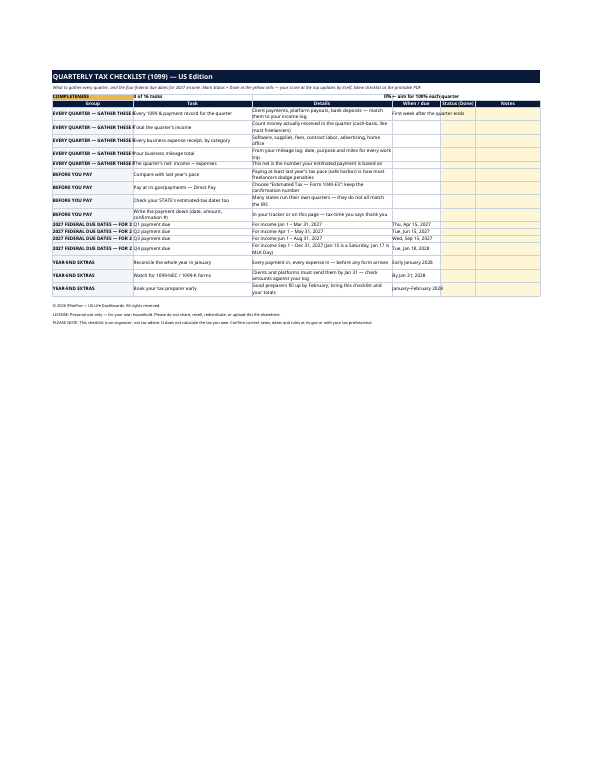
You never build or fix a formula. Type only in the pale-yellow cells — the formula cells are protected (no password) so the math can't be broken by accident. Fictional SAMPLE rows, clearly marked, show you the format; delete them and the file is yours.
What you need
For the PDF: any PDF reader, and a printer if you want the paper copy. For the spreadsheet: Microsoft Excel, or Google Sheets (free with a Google account). The same .xlsx file works in both — upload it to Google Drive, open it, File → Make a copy, and work in your copy. The spreadsheet version is the only part that needs Excel or Sheets; the printable PDF works anywhere.
Instant download
This is a digital download — no physical item will be shipped. After purchase, go to Etsy → Purchases and reviews → Download files, save the file to your computer first, then open it in Excel (click “Enable Editing”) or upload it to Google Drive for Sheets (then File → Make a copy, and always work in your copy).
License
Personal use only — for your own household. Please do not share, resell or redistribute the file.
Questions
What exactly do I receive?
Two files: a one-page printable PDF (US Letter) with checkboxes, and the same 16-task checklist as an Excel spreadsheet with a Done column and an automatic completeness score at the top.
Which year's dates are on it?
The four federal estimated-tax due dates for 2027 income: April 15, June 15 and September 15, 2027, and January 18, 2028 for Q4. Every date is printed with its weekday, and the spreadsheet version's cells are yours to adjust for future years.
Does it tell me how much to pay?
No — that's between you, last year's return and (ideally) a tax professional. The checklist's job is the part people actually get wrong: gathering the right numbers each quarter, paying on the right date, and keeping the confirmation record.
Does it cover my state's estimated taxes?
It includes a standing task to check your state's own dates every quarter, because many states run their own schedule that doesn't match the IRS. It doesn't print 50 different state calendars on one page.
Do I need Excel or Google Sheets?
Only for the spreadsheet version. The PDF prints and works with any PDF reader — if you only want the paper checklist, you're all set.